Overview
The Asset Register is where you create and manage the vehicles and equipment in your fleet. Each asset stores key details like registration, category, fuel type, and FTC apportionment method. Assets must be set up here before GPS apportionment and FTC calculations can be run.
Prerequisites
- You are logged in to Nuonic.
Steps
- In the left sidebar, select
Asset Management, thenRegister. - To add a new asset, select
New Assetand fill in the details. - To edit an existing asset, select its row or use the action menu.
- To link an asset to a telematics device, select
Link Assets to Telematics. - To import multiple assets at once, use
Upload CSVwith the Nuonic asset template. - To export your asset list, select
Export CSV.
Screenshots
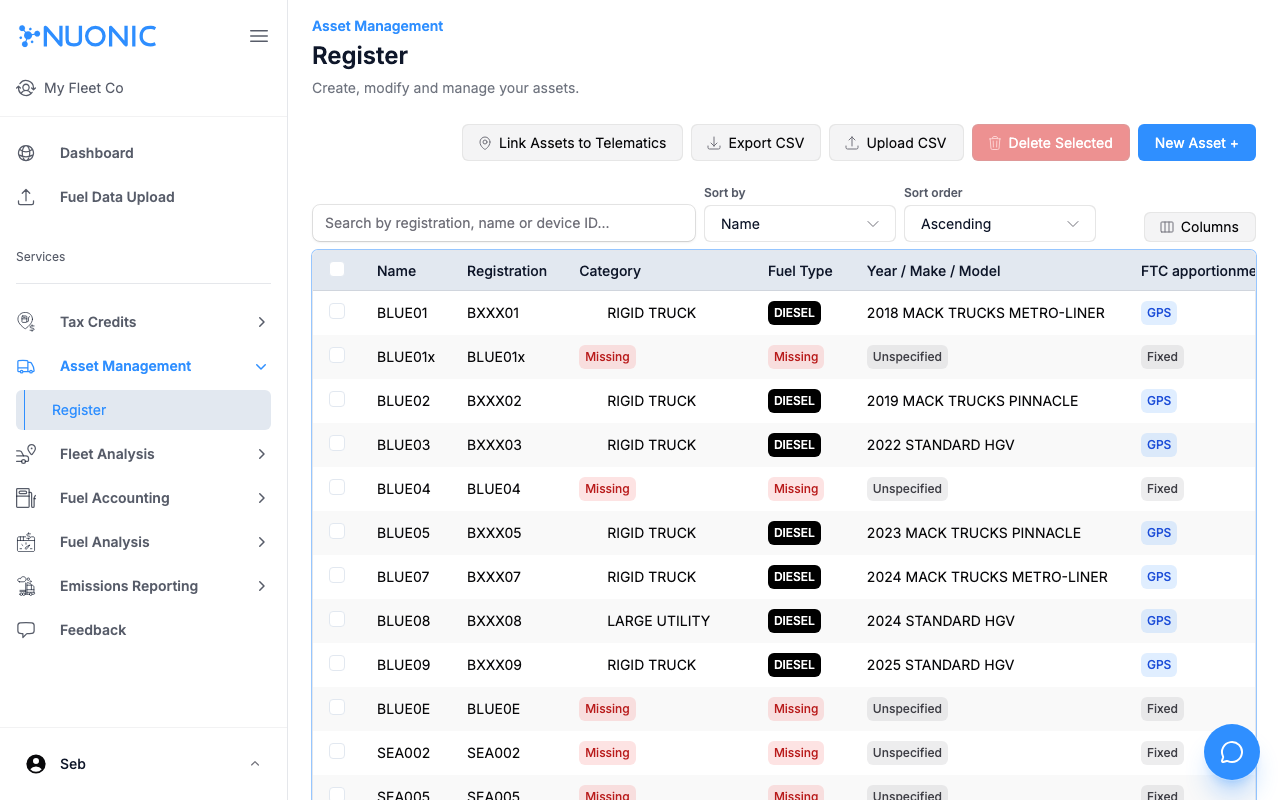
The Asset Register lists all assets with their registration, category, fuel type, FTC apportionment method, and linked telematics device. Assets showing Missing in red need their category and fuel type set before they can be used in FTC calculations.
Troubleshooting
- Assets showing
MissingforCategoryorFuel Typecannot be included in FTC calculations — edit each asset to fill in these fields. - If an asset shows
No linked device, useLink Assets to Telematicsto connect it to your GPS provider.