Overview
Scheduled GPS-calculated FTC reports provide a monthly summary of activity, fuel apportionment, and FTC outcomes for the selected reporting period.
Nuonic provides these reports in two formats:
PDFfor fixed summary reviewExcelfor detailed review and fuel adjustment
The PDF cannot be edited. If fleet details or report inputs change, the report should be regenerated.
The Excel report is the working version used to review calculations in detail and, where required, replace estimated fuel with actual fuel amounts.
What the scheduled reports contain
The scheduled reports summarise the monthly GPS-calculated FTC results for the selected reporting period. Depending on the output format, they can include:
- fleet-level activity apportionment across public road, non-public road, and auxiliary equipment operation (if applicable)
- fleet-level fuel apportionment and estimated FTC outcomes
- a vehicle register with fleet and vehicle reference details
- fleet fuel apportionment by fuel type and FTC rate period
- per-vehicle activity apportionment
- per-vehicle fuel apportionment
- per-vehicle FTC estimates
- adjustment fields in the Excel report for entering actual monthly fuel amounts
PDF report
The PDF report is the fixed summary version of the monthly output.
It is intended for review and distribution, and typically contains the monthly summary of:
- reporting period
- fleet activity apportionment
- fleet fuel apportionment
- estimated FTC outcomes
- fleet and vehicle summary information
The PDF cannot be adjusted directly. If fleet details, vehicle information, or report inputs change, the report should be regenerated rather than edited manually.
Excel report
The Excel report is the detailed working version of the monthly output.
It is intended for:
- reviewing fleet and vehicle-level results in detail
- validating activity and fuel apportionment
- checking FTC calculations by vehicle
- entering actual fuel amounts where they are known
The workbook includes summary and detail worksheets, but the main adjustment area is the FTC Fuel Adjustment tab.
FTC Fuel Adjustment tab
The FTC Fuel Adjustment tab is the main working section of the Excel report.
Use this tab when you want to replace estimated fuel with actual fuel amounts.
How fuel is calculated
Unless actual fuel is entered, the report may use Nuonic estimated fuel consumption figures based on vehicle reference information such as:
- vehicle category
- make
- model
These estimated values are used to derive monthly fuel apportionment and FTC outcomes where actual fuel has not been provided.
Using the FTC Fuel Adjustment worksheet
If you know the actual fuel consumed, you can enter it in the Excel report to adjust the result.
The workbook supports two common approaches:
Method 1: Monthly fleet total fuel
Use this method if you know the total actual fuel consumed across the fleet for the reporting month.
In this case, enter the whole-of-fleet monthly fuel amount in the adjustment worksheet. The workbook then uses the existing apportionment logic to derive adjusted fuel and FTC outcomes.
Method 2: Monthly per-vehicle fuel
Use this method if you know the actual fuel consumed for individual vehicles.
In this case, enter the actual monthly fuel amount for each relevant vehicle in the adjustment worksheet. The workbook then derives adjusted vehicle-level and total FTC outcomes based on those entries.
When to use actual fuel
Use actual fuel where it is available and reliable.
This is particularly useful when:
- purchased fuel for the full month is known
- fuel data is available by vehicle
- the estimated consumption values do not reflect actual fleet usage closely enough for review purposes
Important
- The PDF is a fixed summary output and cannot be edited directly.
- The Excel workbook is the detailed working file for review and adjustment.
- If the underlying fleet details change, regenerate the scheduled reports rather than manually editing the PDF.
- If actual fuel is incomplete, take care when applying partial adjustments.
Screenshots
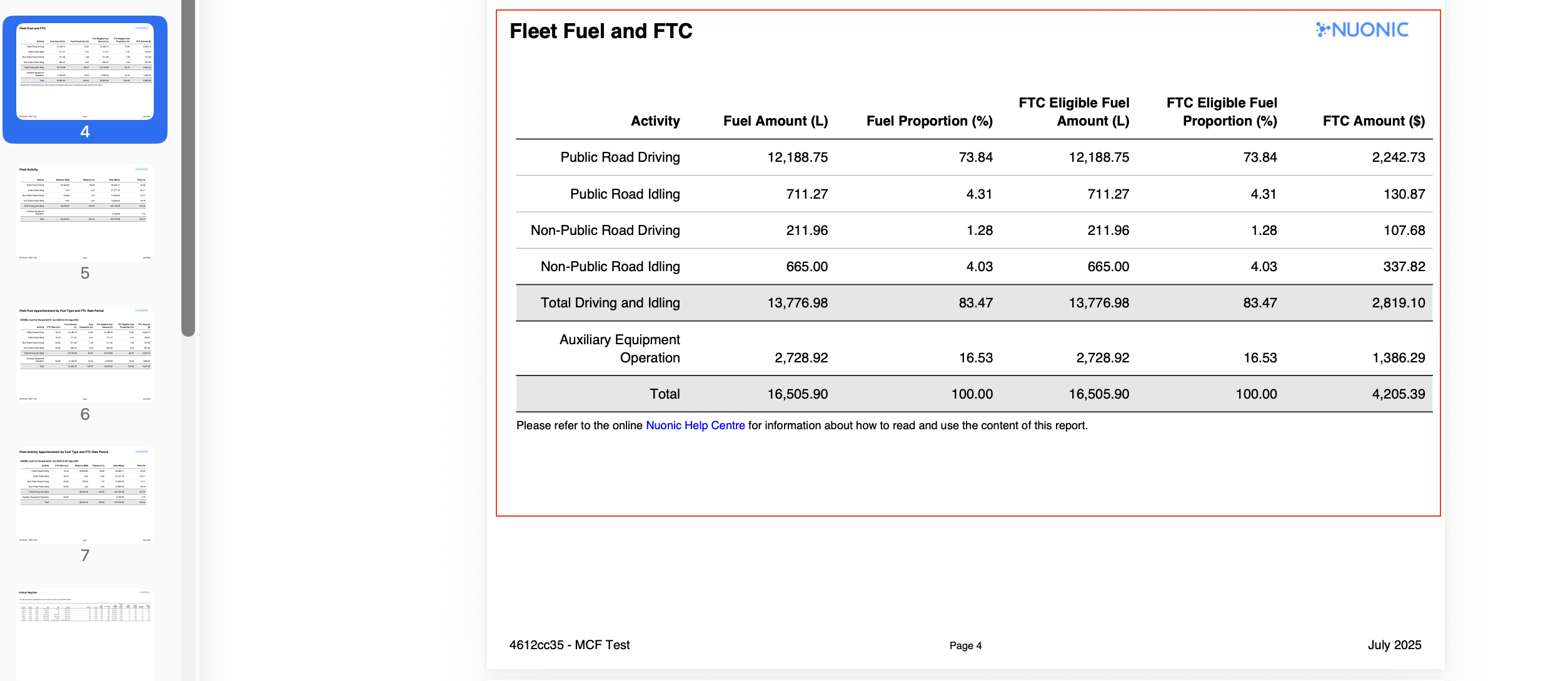 Shows the fixed monthly PDF summary for the selected reporting period.
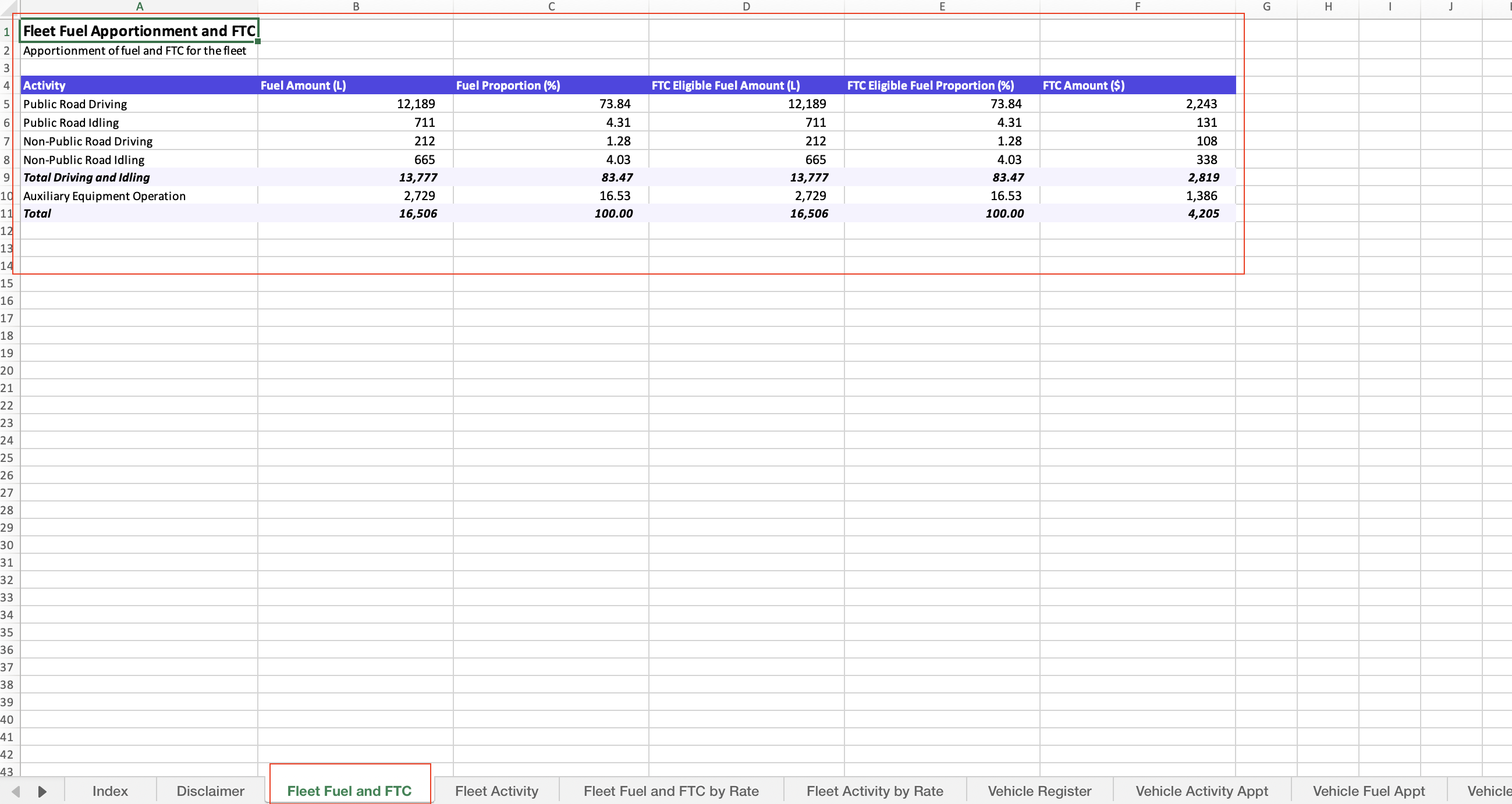 Shows the main Excel workbook summary and the key worksheets used for review.
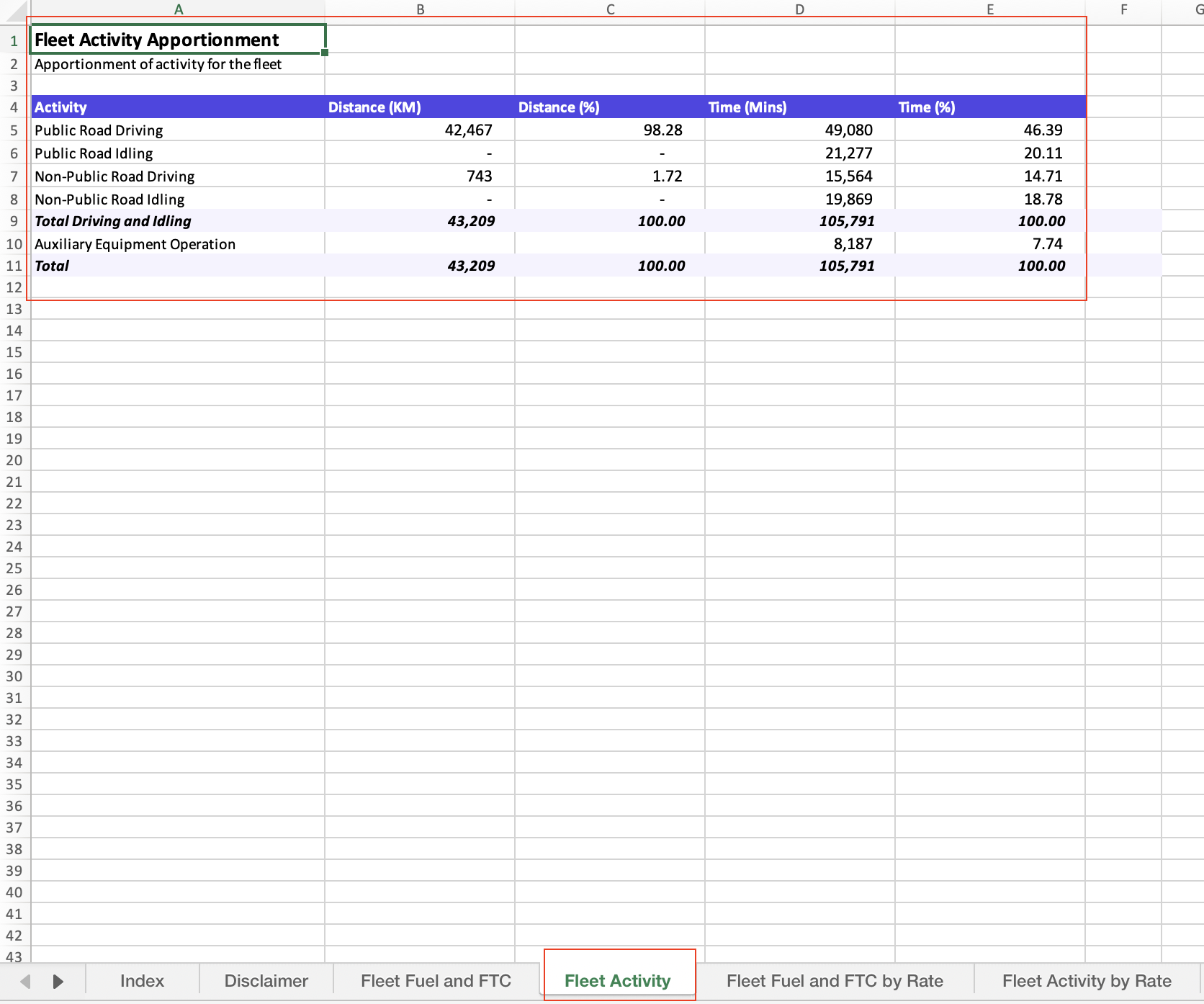 Shows how fleet activity is apportioned across public road, non-public road, and auxiliary categories.
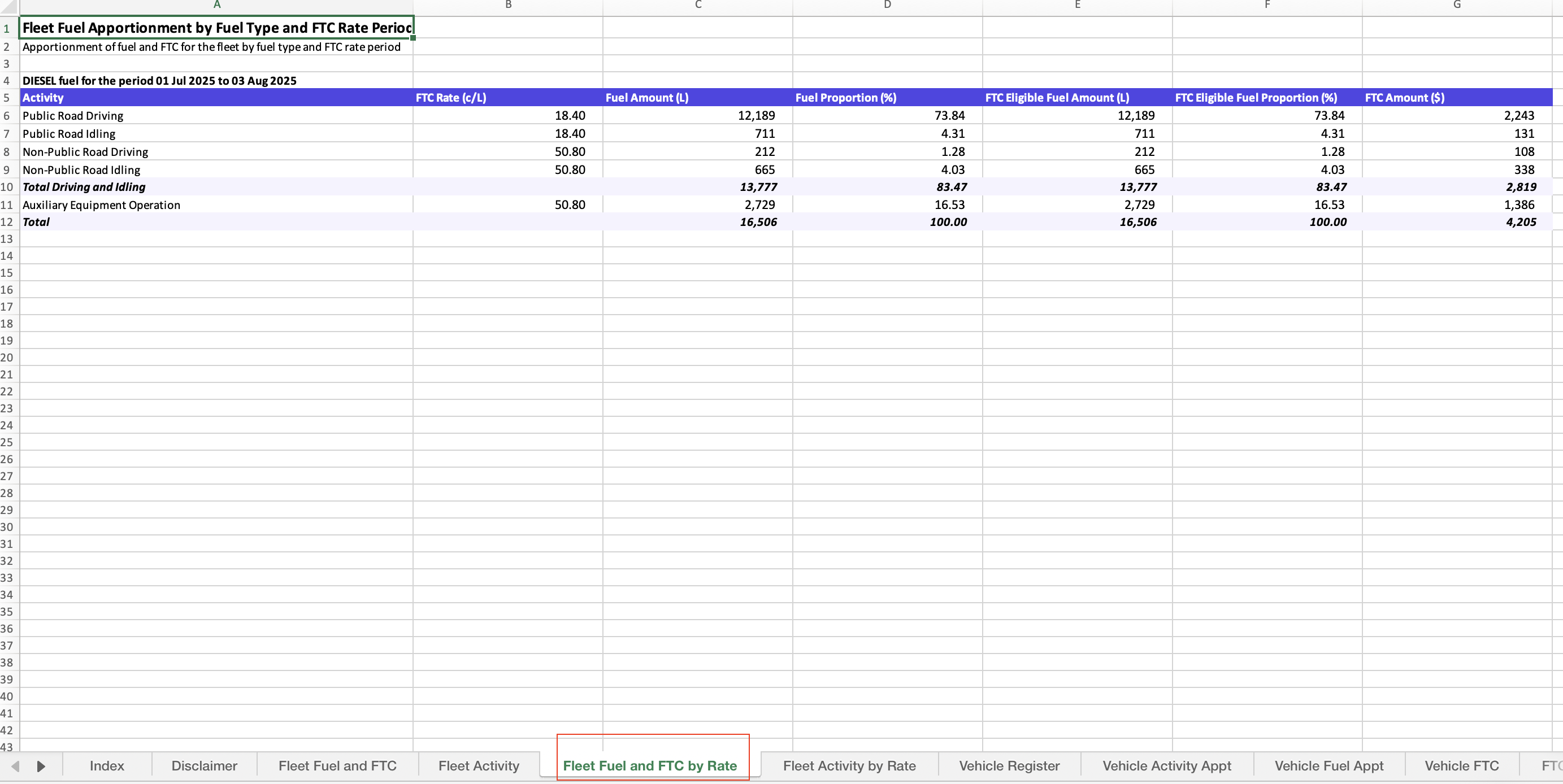 Shows fuel apportionment by fuel type and the applicable FTC rate periods.
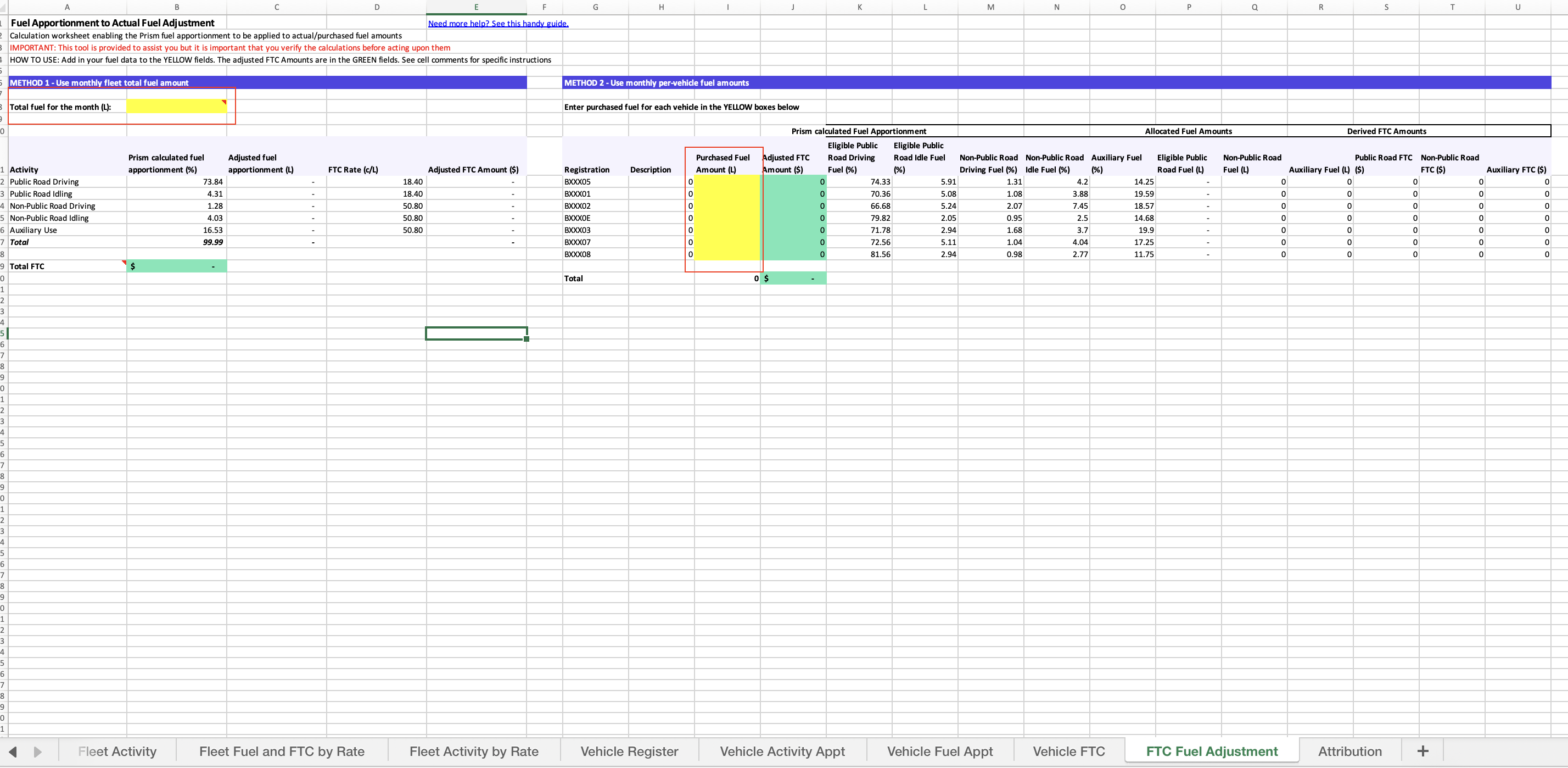 Shows where to enter monthly total fuel or per-vehicle fuel to adjust the estimated FTC outcome.
Troubleshooting
- If the PDF does not reflect the latest fleet setup, regenerate the scheduled report.
- If Excel totals differ from expectations, confirm whether fuel is still estimated or has been adjusted using actual fuel.
- If you only know the monthly fleet total fuel, use the fleet-total adjustment method instead of entering incomplete vehicle data.
- If vehicle-level fuel is incomplete, review the impact before relying on adjusted totals.